Thursday, June 8, 2023

Will it be possible to live on Mars, as Elon Musk has said?

Elon Musk has expressed his ambition to establish a human presence on Mars in the future. While living on Mars is a long-term goal for SpaceX and other space agencies, there are numerous challenges that need to be addressed before it becomes a reality.

Some of the major challenges include:

  • Atmosphere and Climate: Mars has a thin atmosphere composed primarily of carbon dioxide, and its surface experiences extreme temperatures and intense radiation. Creating a habitable environment would require protective structures and the ability to generate breathable air and stable temperatures.
  • Water and Resources: Mars is a barren planet with limited resources. Ensuring a sustainable water supply, as well as extracting and utilizing Martian resources for fuel, construction materials, and life support systems, would be crucial.
  • Transportation and Logistics: Traveling to Mars is a complex and lengthy journey, with current estimates ranging from six to nine months one way. Developing reliable and efficient transportation systems, as well as establishing supply chains to sustain a Martian colony, is essential.
  • Health and Longevity: The long-term effects of living in reduced gravity and exposure to radiation are not yet fully understood. Protecting the health of astronauts during extended stays on Mars and mitigating the risks associated with the Martian environment would be vital.

While these challenges are significant, technological advancements and further research may help overcome them. Several missions, including NASA's Artemis program and SpaceX's Starship project, aim to gather essential data and pave the way for future human exploration and potential colonization of Mars. However, it is important to note that a realistic timeline for achieving a sustainable human presence on Mars is still uncertain and could be several decades away.

Tuesday, May 30, 2023

How to open chrome in kiosk mode with a fixed URL?

To open Google Chrome in kiosk mode with a fixed URL, you can follow these steps:

  • Create a desktop shortcut for Google Chrome (if you don't already have one). Right-click on the desktop or the Chrome executable, select "Create shortcut," and place it on your desktop.
  • Right-click on the newly created shortcut and select "Properties" from the context menu.
  • In the "Target" field, you will see the path to the Chrome executable. Add the following flags at the end of the path:
    • --kiosk --app=<URL>
    • Replace <URL> with the fixed URL you want to open in kiosk mode. For example:
    • Example: "C:\Program Files\Google\Chrome\Application\chrome.exe" --kiosk --app=https://www.example.com
  • Click "Apply" and then "OK" to save the changes.
  • Double-click on the modified shortcut, and Google Chrome will launch in kiosk mode with the specified URL. The browser window will be full screen and locked down, preventing users from accessing the browser's menus or other websites.

Note: Keep in mind that when running Chrome in kiosk mode, it's essential to have a way to exit the kiosk mode. You can press Alt+F4 (Windows) or Command+Q (Mac) to close the browser.

Additionally, please note that the exact location of the Chrome executable may vary depending on your operating system and installation settings. Adjust the path accordingly if needed.

Sunday, May 28, 2023

How can someone with no prior knowledge of web development or programming learn ASP.Net Core?

Learning ASP.NET Core as a beginner with no prior knowledge of web development or programming can be challenging but definitely achievable. Here's a step-by-step guide to help you get started:

  • Understand the Basics: Familiarize yourself with fundamental concepts of programming like variables, data types, control structures (loops, conditionals), and basic algorithms. Learn about HTML, CSS, and JavaScript as they are essential for web development. These languages handle the client-side of web applications.
  • Get Familiar with C#: ASP.NET Core uses C# as its primary programming language. Invest time in learning C# basics, such as syntax, variables, data types, classes, and object-oriented programming (OOP) concepts.
  • Set Up Your Development Environment: Install Visual Studio Code or Visual Studio, which are popular integrated development environments (IDEs) for .NET development. Install .NET Core SDK, which includes the necessary tools to build and run .NET applications.
  • Learn ASP.NET Core Concepts: Study the foundational concepts of ASP.NET Core, such as routing, middleware, MVC (Model-View-Controller) pattern, and dependency injection. Explore the official ASP.NET Core documentation and tutorials provided by Microsoft. They offer comprehensive guides and examples for various topics.
  • Online Tutorials and Courses: Take advantage of online resources, tutorials, and courses designed specifically for learning ASP.NET Core. Websites like Microsoft Learn, Udemy, Pluralsight, and YouTube offer excellent learning materials.
  • Hands-on Practice: Apply what you've learned by building small web applications. Start with simple projects and gradually increase the complexity. Participate in coding exercises and challenges to improve your problem-solving skills.
  • Join Developer Communities: Engage with the developer community to seek guidance, share knowledge, and ask questions. Join forums, online communities, and social media groups related to ASP.NET Core or C#.
  • Explore Sample Projects: Examine open-source projects on platforms like GitHub to see how ASP.NET Core is used in real-world scenarios. Analyzing code written by experienced developers can deepen your understanding.
  • Read Books: Consider reading books dedicated to ASP.NET Core and web development in general. Some popular titles include "Pro ASP.NET Core MVC" by Adam Freeman and "ASP.NET Core in Action" by Andrew Lock.
  • Continuous Learning: Keep up with updates and new features in ASP.NET Core by following official documentation, blogs, and online resources. Technology evolves rapidly, so ongoing learning is crucial.

Remember, learning web development and ASP.NET Core is a journey that requires patience and persistence. Break down complex concepts into manageable parts and celebrate small achievements along the way. Practice regularly and gradually take on more challenging projects to solidify your skills. Good luck!

Saturday, May 27, 2023

What is the best resource for learning .NET, ASP.NET, and MVC framework in .NET?

There are several excellent resources available for learning .NET, ASP.NET, and the MVC framework. Here are some popular options:

  • Microsoft Documentation: The official Microsoft Documentation is a comprehensive resource that covers all aspects of .NET, ASP.NET, and MVC. It provides detailed explanations, tutorials, and examples. You can find documentation at the following links:
  • Microsoft Learn: Microsoft Learn is an interactive learning platform with a wide range of free courses and tutorials for .NET, ASP.NET, and MVC. It offers hands-on exercises, guided learning paths, and assessments. You can access Microsoft Learn here: https://docs.microsoft.com/en-us/learn/
  • Pluralsight: Pluralsight is an online learning platform that provides high-quality video courses on various programming topics, including .NET, ASP.NET, and MVC. It offers a vast library of courses taught by industry experts. You can find .NET courses on Pluralsight at: https://www.pluralsight.com/browse/software-development/dotnet
  • Udemy: Udemy is another popular platform that offers a wide range of video courses, including comprehensive .NET, ASP.NET, and MVC tutorials. It features courses created by different instructors, allowing you to choose the one that suits your learning style. You can explore .NET courses on Udemy at: https://www.udemy.com/topic/dotnet/
  • Books: There are numerous books available that cover .NET, ASP.NET, and MVC in detail. Some highly recommended titles include "Pro ASP.NET MVC Framework" by Adam Freeman, "C# 9.0 in a Nutshell" by Joseph Albahari and Ben Albahari, and "CLR via C#" by Jeffrey Richter.

Remember that learning resources can vary in terms of depth, complexity, and teaching style. It's a good idea to try out different resources to find the ones that resonate with your learning preferences and goals. Additionally, practicing coding exercises, building projects, and participating in developer communities can greatly enhance your learning experience.

Is it possible to learn software development and coding from scratch in an easy way?

Yes, it is possible to learn software development and coding from scratch, and there are several resources available to make the process easier. Here are some steps you can follow:

  • Define your goals: Determine what you want to achieve in software development. It could be building websites, mobile apps, or working with specific programming languages.
  • Choose a programming language: Start with a beginner-friendly language such as Python or JavaScript. These languages have a gentle learning curve and are widely used in various domains.
  • Online tutorials and courses: Many online platforms offer tutorials and courses for beginners. Websites like Codecademy, Udemy, Coursera, and freeCodeCamp provide structured lessons and hands-on coding exercises.
  • Practice coding: Actively engage in coding exercises and projects to reinforce your learning. Practice regularly to build your problem-solving skills and improve your understanding of programming concepts.
  • Join coding communities: Participate in online forums, coding communities, and social media groups where you can interact with fellow learners and experienced developers. This can provide opportunities for discussions, sharing knowledge, and getting feedback on your code.
  • Build projects: Apply your knowledge by working on small projects. Start with simple projects and gradually increase the complexity as you gain confidence. Building projects helps you apply your skills and provides valuable hands-on experience.
  • Learn from open-source projects: Explore open-source projects on platforms like GitHub. Analyze the code written by experienced developers, understand their approaches, and learn from their best practices.
  • Read documentation: Familiarize yourself with the documentation of programming languages and frameworks you are using. Documentation provides valuable insights, examples, and explanations of various functions and features.
  • Stay updated: The field of software development is constantly evolving. Stay updated with the latest trends, frameworks, and best practices through blogs, podcasts, newsletters, and online communities.
  • Continuous learning: Software development is a lifelong learning process. Keep exploring new languages, frameworks, and technologies to expand your skill set.

Remember, learning software development requires dedication, practice, and perseverance. Be patient with yourself, embrace challenges, and celebrate your progress along the way.

Why do programmers keep three-four systems on their desk instead of using a single computer?

Programmers often use multiple systems on their desk for various reasons. While it's not a universal practice, here are some common reasons why programmers might choose to use multiple computers:

  • Specialized Environments: Programmers often work with different technologies, frameworks, or programming languages. Having multiple systems allows them to set up dedicated environments for each technology without the need to constantly switch configurations. For example, they may have one machine set up for web development, another for mobile app development, and so on.
  • Testing and Debugging: Programmers frequently need to test their code in different environments to ensure compatibility and identify potential issues. By using multiple systems, they can simultaneously test their code on different operating systems, browsers, or hardware configurations.
  • Resource Intensive Tasks: Some development tasks, such as compiling large codebases or running resource-intensive simulations, can consume a significant amount of processing power or memory. By distributing the workload across multiple systems, programmers can speed up their development process and avoid overloading a single machine.
  • Separation of Work: Using separate systems helps programmers keep their work organized and separate. They can have one system dedicated to their primary development tasks, another for communication and browsing, and possibly a third for experimenting or testing new tools without risking the stability of their primary environment.
  • Redundancy and Backup: Programmers often deal with valuable code and data. By having multiple systems, they can create redundant backups, ensuring that their work is safe even if one machine fails. They may also use one system as a dedicated backup server or version control system.
  • Collaboration and Pair Programming: In team environments, programmers might have multiple systems to facilitate collaboration. They can work side-by-side with another programmer, sharing screens or code between the systems, which can enhance productivity and teamwork.

It's important to note that not all programmers use multiple systems, and many are perfectly content with a single powerful machine. The decision to use multiple systems depends on individual preferences, specific work requirements, and budget considerations.

Are average software engineers of age 35-40 struggling to find jobs that pay up to their expectations?

While age alone is not a determining factor for job opportunities, there are a few considerations that can impact an individual's job search experience:

  • Experience: Software engineers with 10 to 15 years of experience can bring valuable skills and expertise to the table. However, some companies may prioritize hiring younger engineers due to perceived cost benefits or a focus on new technologies. This can make it more challenging for mid-career professionals to find positions that match their expectations.
  • Evolving technology landscape: The field of software engineering is dynamic, with new technologies and programming languages emerging regularly. Mid-career professionals should ensure they keep their skills up-to-date to remain competitive in the job market. Demonstrating a willingness to learn and adapt can enhance their chances of finding suitable opportunities.
  • Job market demand: The demand for software engineers can vary based on factors such as location, industry, and economic conditions. Some regions or industries may have a higher demand for software engineers, leading to more job opportunities and potentially better compensation. Researching the local job market and understanding the demand for specific skills can be helpful in assessing job prospects.
  • Networking and personal branding: Building a professional network and maintaining an online presence can be advantageous when searching for job opportunities. Engaging in industry events, conferences, and online communities can help mid-career professionals expand their network and uncover hidden job prospects.

Ultimately, the job search process can be influenced by a variety of factors beyond age. Factors such as skills, experience, market demand, and the ability to adapt to new technologies play significant roles in determining job opportunities and salary expectations for software engineers.

Saturday, May 20, 2023

How to send notification on Microsoft Team using Webhook from UiPath?

By using webhook we can send notification on Microsoft Team's channel only. To configure a webhook in UiPath we need an HTTP Request activity and for http request activity we have to install UiPath.WebAPI.Activities package.

Webhook is a post request, so for http request activity we need following information for configuration purpose:

  • Webhook URL 
  • Payload for request
How to create a webhook in Microsoft Team?
I have already created an article for this. Please refer to the below article if you don't know about it.

How to create process in UiPath for sending notification?
Select a Process from New Project section


Provide a name to your process and click on Create button
Click on Main.xaml in project tab
A webhook is a rest API, so to call it from UiPath we need "HTTP Request" activity. To do this we have to install UiPath.WebAPI.Activities package.
Click on Manage Packages => Click on All Packages => In search tab type 'UiPath.WebAPI.Activities' => Click on 'UiPath.WebAPI.Activities' from search result => Click on 'Install' button => Click on 'Save' button
Click on Activities tab
Drag 'HTTP Request' to Main Sequence => Click on Configure button => a pop up window will appear

In the End point text box paste your webhook URL in double quotes("") => From Request Method dropdown select POST => Click on Ok button
In the right panel go to Properties tab => set the Body Format to application/json => In Body provide your payload(webhook supports a specific format only) => Click on OK button
Example of a very simple payload:
"{'title':'New Ticket','text':'Splunk created a new ticket'}"

Now go to Debug File => click on Run
You will get a notification
Go to teams channel and you will see the message 


How to create a webhook in Microsoft Team?

A webhook in Microsoft Team can be created for a team's channel only.

For creating a new team, you can do it under Teams tab. Once you create a new team then a default channel with name "General" is created by Microsoft inside the team.

Teams => Join or create a team => Create team


Now select the team and create a webhook for it
Click on the selected team name=> click on General => click on three dots(...) next to it => click on Connectors

Now from the pop up window click on  "Add" button which is next to "Incoming Webhook"

Once it will add successfully then a "Configure" button will be shown next to "Incoming Webhook"

Click on "Configure" button, a new popup window will open. In the popup window provide a name for your webhook and click on Create button

Once you will done it, webhook URL will generate. You can copy and save it.

How to convert plain string to base64 string in PowerShell?

We can also convert plain string to base64 string in PowerShell. In case you don't have C# or .NET on target machine where you want this conversion then PowerShell will be best choice. For this conversion PowerShell will also use same methods as we used in C#. 
Demo:


How to convert plain string to base64 string in C#?


In C# it is very easy to convert plain string to base64 string. We only have to use System and System.Text namespace in code for this conversion. Both namespaces are by default present in .NET Framework/Core.

Encode:

Decode:

Demo:

Output:


Saturday, March 25, 2023

How to set value in a input hidden field by using model class in ASP.NET MVC?

You can do it by using your model class property into hidden field.


Step1: Include your model class in your cshtml view page

@model <YourApplicationName>.Models.<YourModelClassName>

Step2: By using model class property set it to value attribute of your hidden field

<input type="hidden" value="@Model.<YourModelClassPropertyName>" />

Demo:

Step1: Let's suppose we have a model class "Product" with some properties as given below:


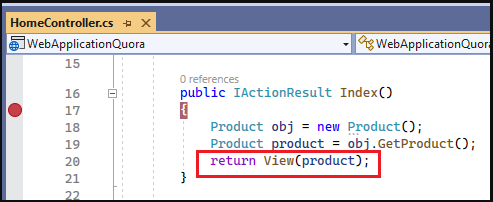
Step2: Now, we have to pass our model class object to it's view page. We can pass it from an action method which will be available in a controller class. Here in this example, I'm creating a Product class object in HomeController's Index method and passing it to view page.


Step3: Now we have to access this class object on our view page. For that we can give a reference of our model class at the top of view page. Also, by using model class property, we are setting the ProductId of the referenced object into hidden field's value attribute.


Step4: 
Now we can see the output. The referenced object's ProductId is visible in input field when we checked by inspecting element in browser.


What are the necessary skills a .NET developer should have?

There are many skills a .NET developer should have to become a good developer. A developer should be good in communication skill, a good problem solver, technical proficient, hard worker and quick learner.

If we talk only about technical skills then he should have below skills.

Essentials skills:

  • .NET Framework - Basic Knowledge
  • C# Programming Language - For writing code
  • Windows Forms - For building desktop applications
  • ASP. NET MVC - For building web applications
  • ASP. NET Web API - For building REST APIs
  • HTMT, CSS, JavaScript & Bootstrap - Client-side technology for building web interfaces
  • SQL Server - for building databases

Good to have skills:

  • LINQ
  • Entity Framework
  • Azure
  • Postman
  • GitHub

How to know .NET Framework version of your project in Visual Studio?


Step1: Go to Solution Explorer of your project and right click on it. Once you will done a property window will open.

Step2: In property window go to last and click on "Properties" option. Once you will done a window will open.


Step3: In newly opened window you will see Application tab. Here, under General section you can find your project target .NET Framework.


Saturday, March 18, 2023

C# Basic Quiz-2

C# Quiz

1. .Net CLR is equivalent to?

2. What is CLR in C#?

3. What does the CLR in C# do?

4. SOAP in C# stands for ___.

5. "Garbage collection automatically reclaims memory occupied by unreachable unused objects." – This statement is true or false in C#?

6. Which symbols are used to mark the beginning and end of a code block?

7. Every C# statement is terminated by ___.

8. Is C# programming language a case-sensitive?

9. In C#, a single-line comment starts with ___.

10. In C#, the multi-line comments placed within the ___.

How to Crack Technical Interview – A newbie fresher?

How to Crack Technical Interview – A newbie fresher?

It’s very simple. You have to be technically sound to crack it. But wait to become a technically sound is not an easy task. You required to be put lots of effort and hard work to become a technical sound person.

The level of questions will depend upon your experience. If you are a fresher then it could be easy but if you are experienced then it could be a level up.

Tips for Fresher:

If you are a fresher then to clear this interview and get a job could be very easy for you. You have to be clear with some of the technical concepts which are generally common in every technical interview process. These are below some concepts which you have to be prepared:

1. Object Oriented Programming (OOPs) Concept - You have to be prepared with below OOPs concept. In every technical interview I faced, they asked me questions from these concepts. Questions could be simply ‘tell me about what is <any below topics>’ or they could ask ‘tell me difference between <any below topic1> and <any below topic2>’. A question that I always faced in almost every technical interview is that ‘what is difference between abstraction and encapsulation?’

  • Objects
  • Classes
  • Abstraction
  •  Inheritance
  •  Polymorphism
  •  Encapsulation

Tips: A suggestion I would like to give here is that while you are preparing for these topics, prepare a real life example as well for each topics. When interviewer asks for the topic then after explaining the definition, explain the same with your real life example.

For example, if they ask you ‘what is abstraction in oops?’ then you can explain this by below answer.

‘An abstraction is a process of hiding the internal data and implementation from the outer world. For example, in an ATM machine, we know how to perform operations like cash withdrawal, money transfer...etc but we really don't know how internally these operations work in ATM machine.’

2. Programming/Coding – For this, you should have knowledge in at least one of the programming language like C, C++, C# or Java. They could ask you to make a given program in any of the selected programming language. Questions are generally asked for checking your problem solving skills. Some the popular programming questions are as below.

  •  Swap two numbers with/without using a third variable.
  • Check whether a number is even or odd.
  • Check if the given number is prime.
  • Program to reverse a string.
  • Check if a string is palindrome.
  • Find the factorial of an integer
  • Program to print a Fibonacci series.
  • Print the total occurrences of a character in a given string.

3. Data Structure & Algorithms – In every technical interview, an interviewer always asks questions related to data structure & algorithms. It is important because when you will develop any project you would be required knowledge of these concepts. These are below some of the topics you have to prepare.

  • Array
  •  List
  •  Linked List
  • Stacks & Queues
  • Heap & Hashing
  •  Dictionary
  • Searching algorithms – Linear &  Binary search
  • Sorting algorithms – Bubble, Merge & Heap sort algorithms

4.  Sql Fundamentals

SQL is another important area to be prepared for clearing technical interview because most of the questions are also asked from this section. Below are the most important areas you have to be cover.

  •  DDL basics - create, drop, truncate, alter
  • DML basics - select, delete, update, insert
  • Keys - primary key, foreign key, unique key, composite key, candidate key
  • Conditional statements - case, if
  • Filter clause - where
  • Joins - inner join, left join, right join, full join
  • Views
  • Triggers
  • Stored procedures
  • Functions

5. Web technology fundamentals – You should also have a basic understanding about below topics

  • html
  •  http
  •  client- server architecture
  • Java script concepts- element selectors (id, class, tags), DOM manipulation operations

Last but not least another most important thing is that you have to practice questions which are previously asked.

I would like to have your feedback. If you have any question, comments or suggestions you can comment below or can email me on my email id.

Thank you for reading this article.


Friday, March 10, 2023

C# Basic Quiz-1

C# Quiz

If you want to test your basic C# skill then please attempt this quiz. It has total 10 objective type questions.

1. Who developed C# programming language?

2. C# runs on top of ___

3. Which type of application(s) can be developed by using C# programming language?

4. Is C# an object-oriented programming language?

5. Is C++ an alias of C#?

6. What is the extension of a C# language class file?

7. Who is the founder of C# programming language?

8. Is C# a type safe programming language?

9. Is C# a structured programming language?

10. CLR stands for ___

How to deploy ASP.NET Core Web API in Azure App Service


How to deploy ASP.NET Core Web API in Azure App Service

In this article, I am going to discuss how to deploy ASP.NET Core Web API application in Azure App Service. Here, we will discuss about below points:

  • How to create App Service in Azure?
  • How to deploy ASP.NET Core Web API in Azure App Service?

How to create App Service in Azure?

Let me first give a brief introduction of Azure App Service. Azure App Service is an HTTP-based service for hosting web applications, REST APIs, and mobile back ends. We can used it to deploy applications built in .NET, .NET Core, Java, Ruby, Node.js, PHP, or Python. It is platform as a service provided by the Microsoft. We don't need to have worry about setup things on machine, because everything is made ready by Microsoft itself.

Based on the technology we have used to build application we have to configure that on creation of App Service. We will do it in this article.

If you haven't seen my previous article then please go through that once because we are going to use the same application for deployment.

Step1: Login to Azure Portal

Step2: Search for App Services in top search bar and click on App Services under Services section


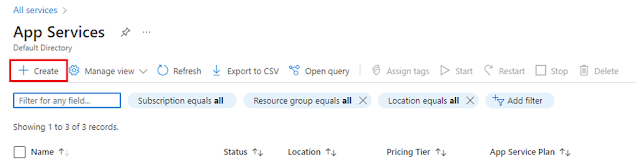
Step3: Click on Create button in App Services page


Step4:

Select your Subscription from available options in dropdown.

Select a Resource Group from available resource groups or Create New.

Provide a unique domain name for your Web API. For this demo I have given name webapidemo1990

Select Code radio button under Publish section


From Runtime stack dropdown select .NET 6(LTS). We are selecting this because we developed ASP.NET Core Web API in .NET 6. Based on your application technology and version you can select the relevant option. On selection of .NET 6(LTS), it will automatically select Windows operating system.

From Windows Plan section click on Create new button and provide a name then select Free F1 (Shared infrastructure) option.

Keep the rest of settings as it is.

Now either you can click on Next : Deployment> button or directly can click on Review + create button


Once you done this, Azure will create App Service for you and on successful creation below screen will be shown:


How to deploy ASP.NET Core Web API in Azure App Service?

Step1:  Go to your ASP.NET Core Web API project and right click on your project solution file name in Solution Explorer.


Step2:  Click on Publish from available options.

Step3:  Select Azure option from publish window and click on Next button.


Step4:  Select Azure App Service option from publish window and click on Next button.


Step5:  It will ask to login on Azure if you haven’t login before.  After login select the App Service from resource group which you had created. Finally click on Finish button.


Step6:  Click on Publish button. It will publish all code to Azure App Service. Once you got Publish succeeded message you can check it via directly browsing Web API url in browser or through any rest client tools like postman.


Step7:  If you have read my previous article you already know we were accessing Web API methods by using below URLs.

http://localhost:xxxxx/xyz/{ControllerName}/{ActionName}

But now these methods will be access by below url.

https://webapidemo1990.azurewebsites.net/xyz/{ControllerName}/{ActionName}

As per our Web API, below are the URLs for methods we created.

https://webapidemo1990.azurewebsites.net/xyz/test/get

https://webapidemo1990.azurewebsites.net/xyz/test/customname


You can also verify response by calling Web API methods through postman as below:

Here, in this article, I try to explain how to deploy ASP.NET Core Web API in Azure App Service with Examples. I hope this article will help you with your need.

I would like to have your feedback. If you have any question, comments or suggestions you can comment below or can email me on my email id.

Thank you for reading this article.

Will it be possible to live on Mars, as Elon Musk has said?

Elon Musk has expressed his ambition to establish a human presence on Mars in the future. While living on Mars is a long-term goal for Space...